
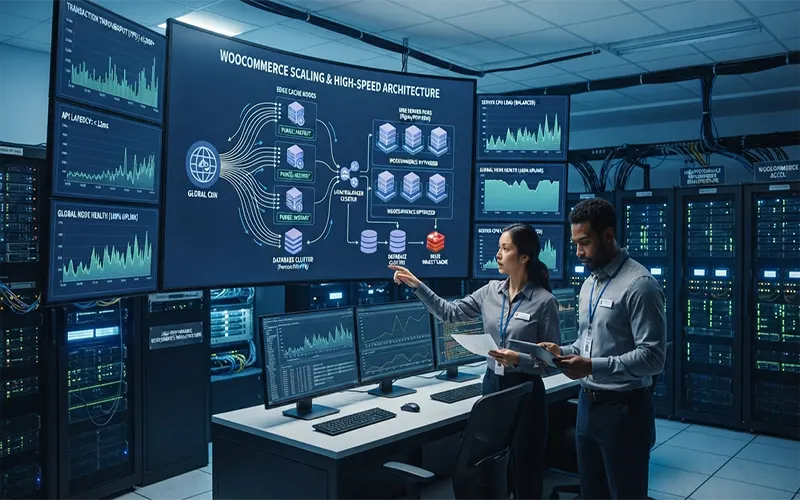
For growing e-commerce brands, nothing kills top-line revenue faster than a sluggish checkout experience during a peak traffic surge or flash sale. Even a one-second delay in page load time can cause a sharp drop in conversion rates and send frustrated shoppers straight to competitors.
While standard WordPress hosting is adequate for low-traffic blogs and brochure sites, WooCommerce stores have vastly different computational demands. Scaling a high-volume online store requires moving away from generic shared environments and adopting a specialized, high-speed managed WordPress hosting architecture engineered specifically for e-commerce workloads.
The Anatomy of WooCommerce Scale Failures
WooCommerce is an exceptionally powerful and flexible e-commerce engine, but it is also computationally heavy. Unlike static websites, e-commerce platforms rely heavily on dynamic, non-cacheable interactions.
- The Database Bloat Trap (wp_postmeta): Every product attribute, customer order, session state, and transient record writes directly to the database. Without proper indexing and optimization, the database quickly becomes the primary system bottleneck.
- Dynamic Cart and Checkout Sessions: Standard page caching tools cannot cache the shopping cart, checkout, or user account pages for logged-in customers. Every time a user adds an item to their cart, AJAX requests fire to update fragment counts, hitting the server dynamically.
- The “Noisy Neighbor” Effect: On cheap shared hosting, a sudden traffic spike on another site hosted on the same server can consume available CPU and RAM, dragging down your WooCommerce store’s performance and causing checkout failures.
Core Pillars of Specialized High-Speed Hosting Architectures
To sustain heavy traffic and high transaction volumes without latency, specialized managed WooCommerce hosting relies on a multi-tiered, performance-tuned infrastructure stack:
- Persistent Object Caching (Redis/Memcached): By storing frequently accessed database queries, session data, and transients in system memory rather than querying the database on every page view, object caching reduces database load by up to 80%.
- Advanced Page & Edge Caching with Intelligent Bypasses: Utilizing enterprise CDNs and edge workers that cache static assets and non-personalized catalog pages globally, while enforcing strict bypass rules for dynamic requests like carts and checkouts.
- Isolated Resource Containerization: Guaranteeing dedicated CPU cores and RAM allocations per store (often via Docker or Kubernetes orchestration), completely eliminating the noisy neighbor vulnerability.
- Optimized Database Infrastructure: Leveraging high-performance NVMe storage, dedicated MySQL/MariaDB tuning, query caching, and read replicas to separate heavy analytical queries from transactional checkout writes.
Step-by-Step Architectural Evaluation Framework
When auditing your current infrastructure or designing a scalable hosting environment for high-volume WooCommerce operations, follow this four-step engineering framework:
Step 1: Audit Current Load and Bottlenecks
Perform comprehensive load testing (using tools like k6 or Apache JMeter) under simulated concurrent user traffic.
- Monitor Time to First Byte (TTFB), slow database query logs, and PHP-FPM worker saturation limits.
- Identify which plugins, API endpoints, or database tables spike under heavy checkout activity.
Step 2: Implement Persistent Object Caching
Ensure your hosting environment supports native Redis or Memcached integration. Configure object cache plugins correctly to offload WooCommerce session storage and customer transients, freeing up immediate database capacity.
Step 3: Decoupling Dynamic Sessions and Cart Fragments
Optimize how your store handles cart updates. Minimize heavy AJAX fragment refresh calls, implement edge-side includes (ESI) where applicable, and ensure that cached pages do not leak session states between different users.
Step 4: Establishing Redundancy and Auto-Scaling
Deploy a resilient architecture featuring redundant load balancers, horizontally scalable application containers, and automated failover for database nodes. This ensures predictable, high-availability performance during major marketing campaigns and flash sales.
Measurable Business Impact on Revenue and UX
Investing in specialized WooCommerce hosting architecture directly translates into bottom-line business value:
- Lift in Conversion Rates: Eliminating micro-stutters and reducing checkout load times directly protects your revenue stream from abandoned checkouts.
- Improved Search Engine Rankings: Lightning-fast Core Web Vitals scores boost organic search visibility, driving more qualified buyer traffic to your catalog.
- Maximized Operating Uptime: High-availability infrastructure ensures your store remains bulletproof during high-stakes sales events.
Scaling a WooCommerce store from hundreds to thousands of daily transactions requires more than just installing a caching plugin—it demands an enterprise-grade infrastructure built for e-commerce. By transitioning to a specialized managed WordPress hosting architecture featuring persistent object caching, isolated containerization, and optimized database clusters, online retailers can eliminate bottlenecks, protect conversion rates, and build a resilient foundation for long-term growth.

Selecting a Dedicated Server for your website can be a challenging task given the number of options available in the Read more

There are different types of web hosting services available to website owners. These include Shared hosting, cloud hosting, Virtual private Read more

You can start a website for free with a free web hosting company. However, free web hosting comes with a Read more

A web hosting service is the organization that provides a space to store a website. The web host manages the Read more